$ cat index.mdx$ cat ~/blogs/engineering/serve-static-files-with-nginx-without-breaking-your-mime-types/index.mdx # I put my name on this
Serve Static Files with Nginx Without Breaking MIME Types
By the end of this guide your nginx serves an HTML page and its stylesheet from disk, and both arrive with the correct Content-Type. Along the way you hit the trap that catches most people the first time: the moment you teach nginx about one file type, it forgets the handful it already knew.
Every command and every output block below was run against nginx 1.30.4.
Prerequisites
- nginx installed and runnable (
nginx -vprints a version) - Permission to edit
nginx.confand to reload the service curlfor checking response headers
1. Create the site directory
Serving static files is the original job of a web server. Give it something to serve.
sudo mkdir -p /var/www/demo
cd /var/www/demo
Create index.html:
<!doctype html>
<html lang="en">
  <head>
    <meta charset="utf-8">
    <title>Static Demo</title>
    <link rel="stylesheet" href="/style.css">
  </head>
  <body>
    <h1>Static files, served from disk</h1>
    <p>This page and its stylesheet are plain files under <code>/var/www/demo</code>.</p>
  </body>
</html>
2. Point nginx at the directory
Open your nginx.conf and set the root for the server block:
server {
    listen 8080;
    root   /var/www/demo;
    index  index.html;
}
root is the directory nginx joins with the request path to find a file. A request for /style.css becomes /var/www/demo/style.css. index names the file to return when the request ends in a slash.
Caution:
rootneeds an absolute path. A relative value likeroot demo;resolves against nginx's prefix directory, not your shell's working directory. I tested it: the config passesnginx -tcleanly and then every request returns 404, which looks like nginx ignoring you rather than a path mistake.
3. Test the config, then reload
Never reload blind. Test first:
nginx -tnginx: the configuration file /etc/nginx/nginx.conf syntax is ok
nginx: configuration file /etc/nginx/nginx.conf test is successful
Only then reload:
nginx -s reloadnginx -s reload starts new workers with the new config and retires the old ones, so live connections are not dropped.
4. Verify the page and its content type
curl -I http://localhost:8080/HTTP/1.1 200 OK
Server: nginx/1.30.4
Content-Type: text/html
That Content-Type matters more than it looks. It is the header the browser reads to decide what a file actually is.
5. Add a stylesheet, and watch the header go wrong
Create /var/www/demo/style.css:
body {
  background: #10141c;
  color: #e8ecf3;
  font-family: -apple-system, BlinkMacSystemFont, sans-serif;
}
Link it from index.html, inside <head>:
<link rel="stylesheet" href="/style.css">Reload nginx, then check the stylesheet specifically:
curl -I http://localhost:8080/style.cssHTTP/1.1 200 OK
Content-Type: text/plain
Content-Length: 1109
text/plain, not text/css. Note the status: 200, not 404. The file is found and delivered in full. A browser in standards mode still refuses to apply a stylesheet served as plain text, so the page renders completely unstyled while every request looks healthy.
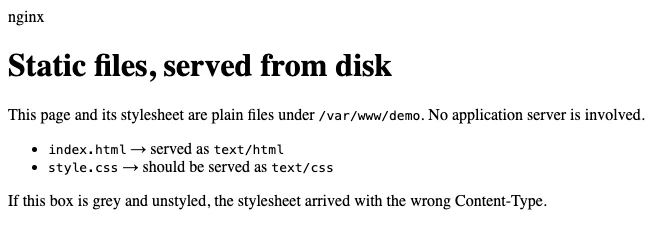
The page with its stylesheet served as text/plain. The CSS downloaded fine. Chrome refused to apply it.
Here is why. With no MIME configuration of your own, nginx falls back to a built-in map with exactly three entries:
types {
    text/html  html;
    image/gif  gif;
    image/jpeg jpg;
}
HTML is in that list, which is why step 4 worked. CSS is not, so it falls through to default_type, which defaults to text/plain.
6. The obvious fix, and the trap inside it
The natural move is to declare the type you are missing. Inside the http block:
http {
    types {
        text/css css;
    }
    # ...
}
Test, reload, and check the stylesheet:
curl -I http://localhost:8080/style.cssContent-Type: text/css
Fixed. Now check the page you already had working:
curl -I http://localhost:8080/Content-Type: text/plain
Your HTML just broke, and the browser shows it in the bluntest way possible:
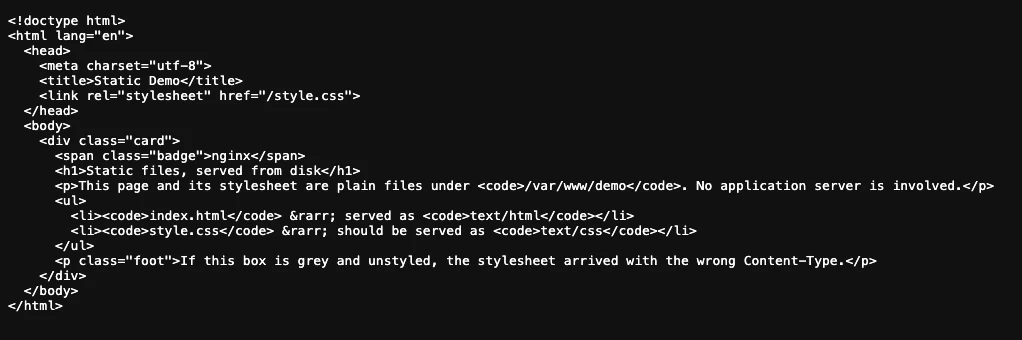
Same page, one config change later. Served as text/plain, the browser stops parsing and prints your markup.
A types block does not add to the built-in map, it replaces it. The three defaults are gone, and nginx now knows exactly one extension: css. Everything else, HTML included, drops to default_type.
You can patch it by listing HTML too, but that road ends with you hand-maintaining an entry for every extension you will ever serve: JavaScript, SVG, WOFF2, MP4, and the rest.
7. The fix that actually works
nginx ships the full map already. It sits next to your config:
http {
    include      /etc/nginx/mime.types;
    default_type application/octet-stream;
    # ...
}
Delete your hand-written types block first. include pulls in a types block covering every common extension, so you inherit hundreds of mappings instead of maintaining three.
Two details worth keeping:
- Put
includein thehttpblock, not insideserver. One declaration covers every site. - Set
default_typetoapplication/octet-stream. An unknown file then downloads instead of rendering as text, which is the safer failure.
Test, reload, and check both files:
nginx -t && nginx -s reload
curl -I http://localhost:8080/ | grep -i content-type
curl -I http://localhost:8080/style.css | grep -i content-type
Content-Type: text/html
Content-Type: text/css
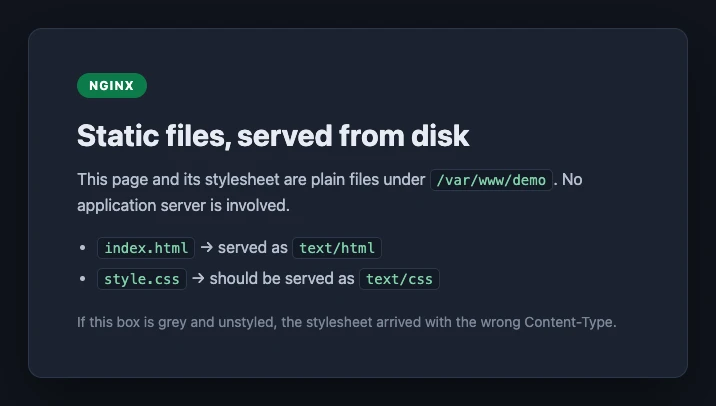
Both types correct. The stylesheet is applied, which is the only proof that matters.
Open http://localhost:8080/ in a browser. If the page renders styled, the stylesheet was accepted rather than merely delivered.
8. Serve different folders for different paths
One root covers a whole site, but you often want media somewhere else. Add location blocks:
server {
    listen 8080;
    root   /var/www/demo;
    index  index.html;

    location /images/ {
        root /var/www/assets;
    }

    location ~* \.(mp3|mp4)$ {
        root /var/www/media;
    }
}
A request for /images/logo.png now resolves to /var/www/assets/images/logo.png, because root appends the full request path. If you want /images/ stripped instead, use alias /var/www/assets/; and note that alias wants the trailing slash.
The regex location matches by extension and takes any MP3 or MP4 from /var/www/media, wherever it sits in the URL.
Verify each route the same way you verified the first:
curl -I http://localhost:8080/images/logo.png9. Audit every type at once
Checking one file at a time is how you miss the third one. Once a site has more than a couple of asset types, sweep them:
for f in / /style.css /app.js /logo.svg /font.woff2; do
  printf '%-14s %s\n' "$f" "$(curl -sI "http://localhost:8080$f" | grep -i '^content-type' | tr -d '\r')"
done
Read the output as pairs: every line's type must match its extension. Anything reporting text/plain is a file nginx has no mapping for, and anything reporting application/octet-stream is a file that will download instead of render. Both are the same bug wearing different clothes.
Worth running after any change to a types block, and worth keeping in whatever smoke check you run against a deploy.
What you have now
nginx serving a real directory, correct Content-Type headers on every file type, and separate roots for media.
Three things worth carrying forward:
- Reach for
include mime.typesfirst. Treat a hand-writtentypesblock as an override that costs you every default, not an addition. - When a page looks broken, read the
Content-Typebefore the status code. 200 and wrong is a far harder bug to see than 404, because every tool you would normally reach for reports success. default_type application/octet-streamturns a silent mis-render into an obvious download. Failing loudly is the point.
Next steps
- Add
expiresandCache-Controlso browsers stop refetching unchanged assets - Turn on
gzipfor text assets - Put
try_files $uri $uri/ /index.html;in front of a single-page app
Reproduced end to end against nginx 1.30.4. Every config, command, output block and screenshot above came from that run.