$ cat index.mdx$ cat ~/blogs/engineering/run-multiple-claude-code-agents/index.mdx # I put my name on this
How to Run Multiple Claude Code Agents at Once (2026)
To run multiple Claude Code agents at once, give each agent its own terminal pane, its own task and, when it edits code, its own git worktree.
The quickest way I have found to run Claude Code agents in parallel is herdr plus herdr-setup on GitHub, a free, open-source installer I wrote.
One command installs it, then fleet up 6 2 claude,codex opens six Claude Code and Codex agents in two tabs, and fleet send hands each one a task.
To see it before installing anything, open the herdr-setup interactive manual: it runs in your browser, draws the exact layout, and hands you the command to copy.
I build with AI coding agents every day, and one agent is rarely enough. I start one on a feature, a second to review the diff and a third to chase a flaky test, and soon I am juggling windows and pasting the same prompt three times. herdr-setup is the agentic coding setup I built to fix that, for Claude Code, Codex and Agy (the Antigravity CLI), side by side in one terminal.
Why run multiple Claude Code agents in parallel
Most real work splits into pieces that do not depend on each other. Run them one after another and you spend the day waiting on a single agent. Parallel agents also check each other: one writes the change, and a second reviews it with a fresh context.
Claude Code also has built-in ways to run parallel work, covered in Claude Code's own guide to parallel work. This setup is complementary: separate, fully visible sessions you can watch and steer, across different agents, from one terminal.
The problem with juggling terminals
Starting several agents is easy. Keeping track of them is not:
- You type a task into an agent that is still booting, and it sits in the input box, unsent.
- An agent stops at a startup question such as "trust this folder", and you think it is working.
- You lose the window that holds the agent waiting on you.
Each one multiplies with every agent you add, so the fix has to be automatic.
What herdr is (and herdr vs tmux)
herdr is a terminal workspace manager built for AI coding agents.
A workspace is one project, a tab is a layout inside it, and a pane is one real terminal.
The sidebar marks each agent working, blocked, done or idle, and blocked means it is waiting for you.
Close the window and the agents keep running in a background server; run herdr again to come back.
tmux users will feel at home, because the prefix key is the same ctrl+b.
The difference is that tmux, out of the box, has no idea a pane is running an agent.
| Row label | tmux | herdr |
|---|---|---|
| Panes, tabs, detach and reattach | Yes | Yes |
| Shows which agent is waiting on you | No | Sidebar status per agent |
| Start an agent and wait until it is ready | No | herdr agent start |
| Send a prompt and wait for the answer | No | herdr agent prompt --wait |
That agent awareness is what makes fleet reliable.
For plain split panes, tmux is fine.
How to use herdr-setup: the repo and the interactive manual
The interactive manual is where you plan and learn, and the herdr-setup repo is where you install from. It is free, MIT licensed, and built on the herdr-plus plugin by cloudmanic.
Step 1: Try it in the browser first
Open mrx-arafat.github.io/herdr-setup, with no install and no sign-up:
- Start here: the one-line installer, the requirements, and a 30-second first run.
- Fleet planner: pick a worker count, tabs and agents, then see the exact grid
fleetbuilds and the command to copy. - Delegate: write one task per worker and get the
fleetcommands, or a prompt for your main agent. - Manage & clean: see what is running, reset a worker's memory, and close workers.
- Keys & shell, Working agreement and Tested: every shortcut, starter rules, and what was tested on which versions.
Step 2: Install from the repo
You need macOS or Linux, herdr 0.7.0 or newer, jq, curl, and one agent CLI you are signed in to: claude, codex or agy.
Then run the installer:
# install, asking once before it adds the herdr-plus plugin
curl -fsSL https://raw.githubusercontent.com/mrx-arafat/herdr-setup/main/install.sh | sh

# the same with no questions, for scripts and fresh machines
curl -fsSL https://raw.githubusercontent.com/mrx-arafat/herdr-setup/main/install.sh | sh -s -- --yes
Or read it first, which I recommend for anything you pipe into a shell:
curl -fsSL https://raw.githubusercontent.com/mrx-arafat/herdr-setup/main/install.sh -o install.sh
less install.sh
sh install.sh
It never overwrites a file you already have, skips keys you already use, and backs up config.toml before editing it, so running it again is safe.
When it finishes, herdr config check prints config: ok.
Step 3: Your first five minutes
-
Run
herdrinside a project folder. -
Press
ctrl+b, let go, press Down, typeclaudeand pressEnter: a Claude Code tab opens in that folder. -
Press
ctrl+b, then Down, typeworkers, and pick 6 workers, two tabs: agentsw1tow6appear. -
From another pane in the workspace, hand out and collect work:
fleet send w1 "Add input validation to the signup form and a test for it" fleet send w2 "Find out why the orders test is flaky and fix it" fleet wait all fleet read w2 -
Clean up with
fleet close all.
Step 4: Where to go next
The full herdr-setup guide in the repo covers project files, worktrees, shell suggestions and one rules file for every agent. Star or fork the repo to keep it close and shape it to your own workflow.
Launch a Claude Code agent in three keystrokes
ctrl+b    press it, then let go
Down      opens Quick Actions
claude    type to filter the list
Enter     opens a new claude tab in the current folder
Claude's screen then shows bypass permissions on, explained in the dangerous flags section.
After ctrl+b, press | Then type | You get |
|---|---|---|
| Down | claude, codex or agy | That agent in a new tab, in the current folder |
| Down | grid | One tab with Claude, Codex, Agy and a shell in a 2x2 grid |
| Down | workers | Nine ready-made layouts from 2 to 8 agents, or your own |
One bug surprised me while building the picker: it fuzzy-matches your typing against an action's name and description together.
With long descriptions, typing agy ranked "Search Google" above the Agy launcher, because a, g and y appear in that order in its text.
Short descriptions fixed it.
Run six Claude Code agents at once with fleet
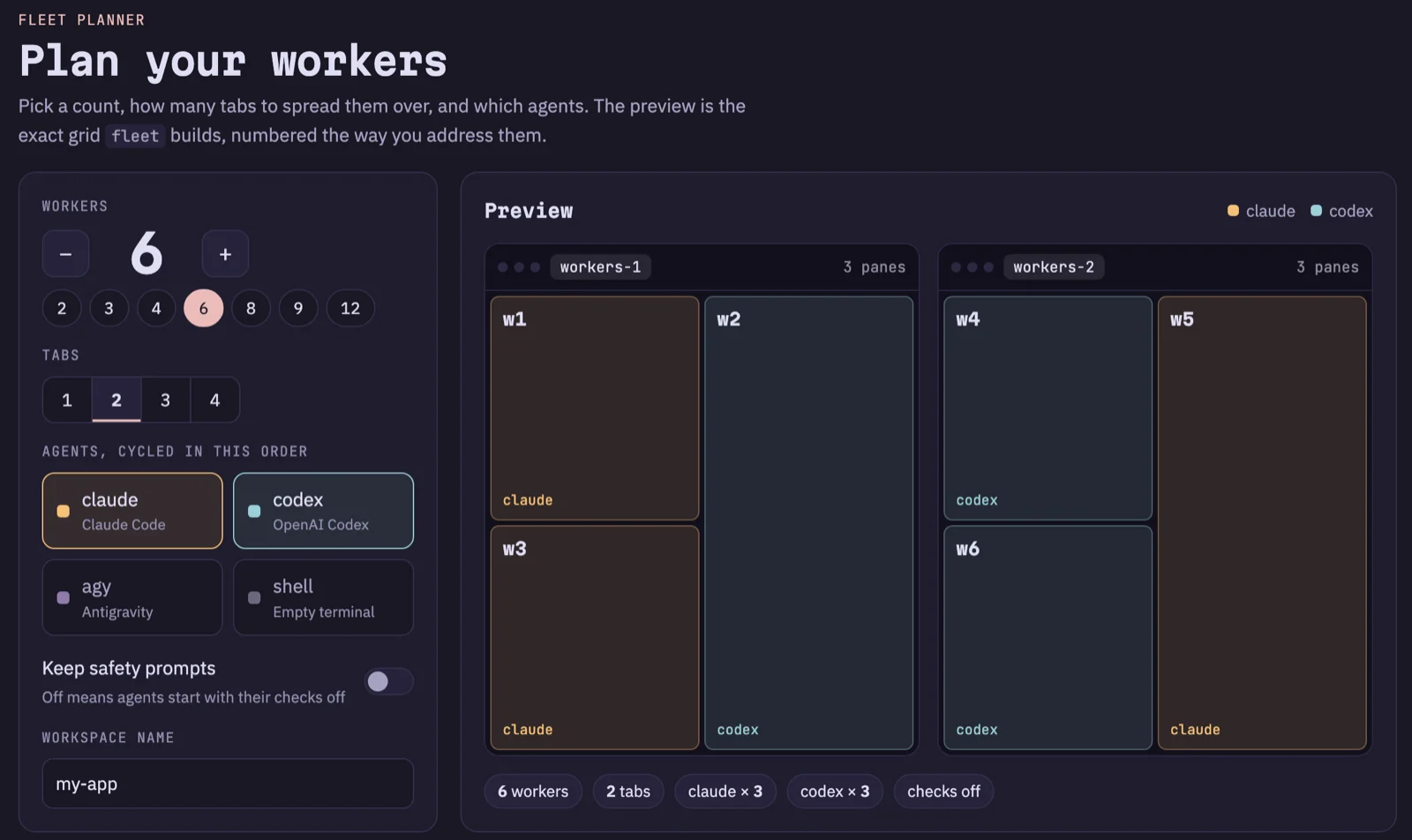
fleet up <count> [tabs] [agents] spreads workers evenly across tabs in balanced grids, labelled w1, w2 and so on, left to right, top to bottom.
| Command | Layout |
|---|---|
fleet up 4 | 1 tab, 2x2, four Claude workers |
fleet up 6 2 | 2 tabs of 3 |
fleet up 8 2 | 2 tabs of 4, each 2x2 |
A comma list of agents cycles, so fleet up 6 2 claude,codex gives you three Claude Code and three Codex workers, alternating.
The detail that makes it dependable: fleet up only returns when every agent is ready for a task.
It starts each one through herdr's agent start, which waits for the agent to finish booting.
Each worker prints a line ending in ready, then the run ends with:
started 6 worker(s) in 2 tab(s). Next: fleet send w1 "<task>"A worker that says not ready stopped at a startup question such as "trust this folder", so click it and answer.
One fleet up takes up to 12 workers, and running it again keeps counting, so a second fleet up 2 adds w7 and w8.
The fleet planner in the interactive manual shows the grid before you run anything:
The multi-agent workflow: hand out work, wait, read results
From any other pane in the workspace, such as a terminal tab, a full round looks like this:
fleet up 6 2 claude,codex
fleet send w1 "Add input validation to src/signup.ts and write a test for it"
fleet send w2 "Find why tests/api/orders.test.ts is flaky and fix it"
fleet wait w1,w2
fleet read w2
fleet close all
fleet sendwaits for a still-starting agent, so no task sits unsent.fleet wait w1,w2blocks until both are idle, done or blocked, for up to 10 minutes by default.fleet read w2prints worker 2's last 60 lines.fleet close allasks before it closes anything, and--yesskips the question.
Targets are w3 or 3, a list like w1,w4, all, or idle.
fleet send --wait all "task" sends to everyone and returns when all of them finish.
fleet clear all sends /clear to every Claude Code and Codex worker, after which Claude's context counter reads 0 tokens.
Agy has no verified clear command yet, so relaunch Agy workers instead.
Let your main agent drive the fleet
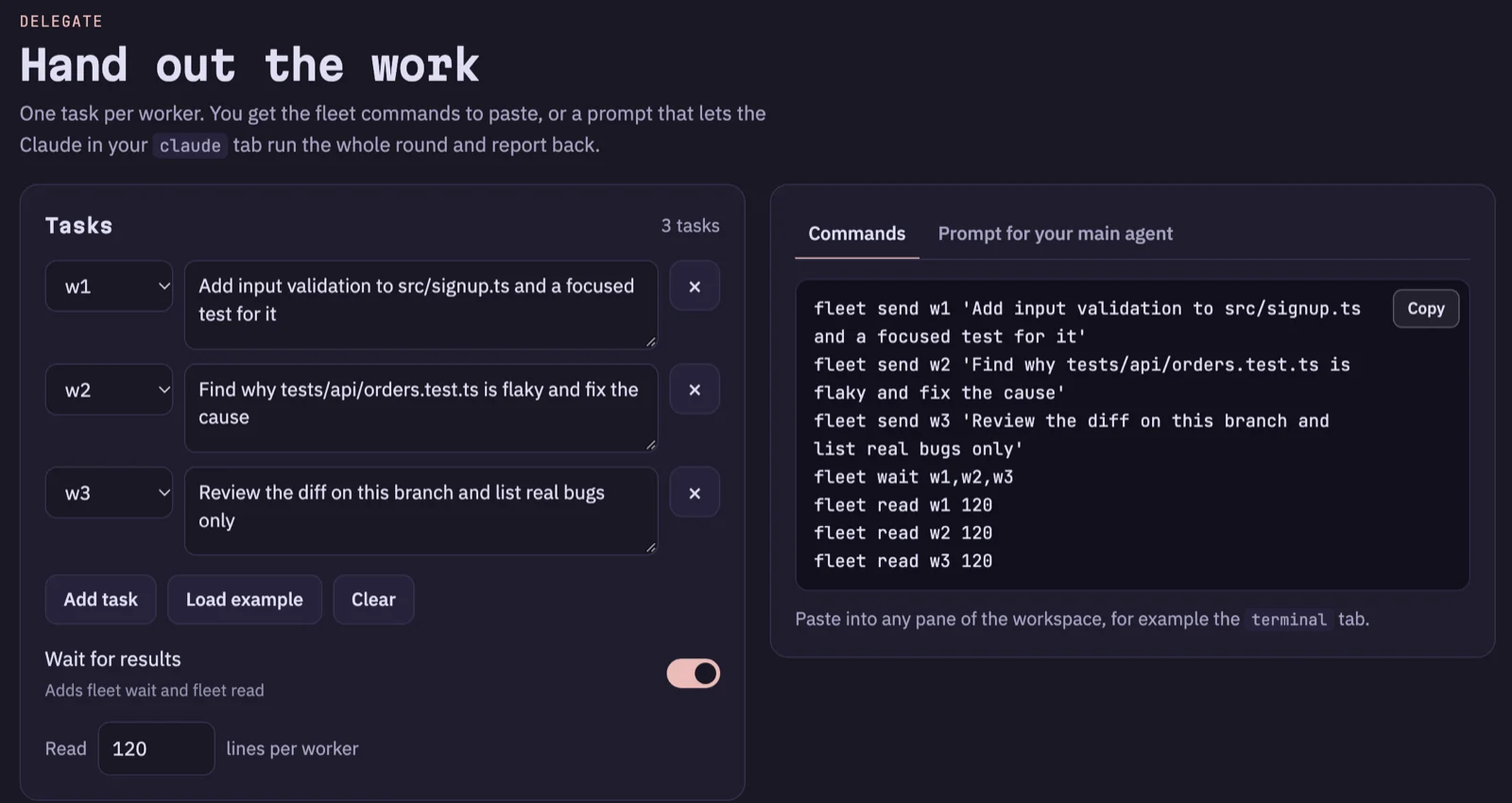
fleet is an ordinary shell command, so the Claude Code in your main tab can run it:
Split this into three independent tasks.
Use fleet send to give one to each of w1, w2 and w3, then fleet wait all,
then fleet read each worker and summarize what they did.
The delegation builder in the manual writes either version for you: the commands to paste, or a prompt for your main agent.
Avoid collisions with git worktrees
Every worker in a workspace starts in the same folder, so two agents editing the same files will step on each other. Either give them tasks that touch different files, or give each task its own git worktree: a separate checkout of the repository, in its own folder, on its own branch. herdr opens each worktree as its own workspace:
cd ~/code/my-app
for task in login-form rate-limit audit-log; do
  herdr worktree create --cwd "$PWD" --branch "feat/$task" --no-focus
done
herdr worktree list
Run fleet up inside each worktree's workspace, or add the optional files/worktrees/default.toml from the repo so every new worktree opens with a claude tab ready.
That file starts Claude Code with prompts off, which is why the installer leaves it out.
My rule is one worktree per task or pull request, removed with herdr worktree remove --workspace <id> once the branch is merged.
The dangerous flags: skip permissions in Claude Code, Codex and Agy
To feel instant, every launcher turns permission prompts or the sandbox off:
| Agent | Flag the launcher uses | What it turns off | On-screen sign |
|---|---|---|---|
| Claude Code | --dangerously-skip-permissions | Asking before it edits files or runs commands | bypass permissions on |
| Codex | --dangerously-bypass-approvals-and-sandbox | Every approval prompt, and the sandbox | permissions: YOLO mode |
| Agy | --dangerously-skip-permissions | Tool permission requests, which it auto-approves | No banner |
Claude Code --dangerously-skip-permissions
The flag stops Claude Code from asking before it edits a file or runs a command, so anything your user account can do in that shell, the agent can do unprompted. That is what makes six parallel agents practical, and it is also the risk: a wrong command runs before you can read it. For a real example, read how an AI agent opened my server to the internet.
What is the Codex equivalent of --dangerously-skip-permissions?
Codex has no --dangerously-skip-permissions flag.
The equivalent is --dangerously-bypass-approvals-and-sandbox, and it goes further: it skips every approval prompt and also runs commands without Codex's sandbox.
Codex's own help text for it reads:
EXTREMELY DANGEROUS. Intended solely for running in environments that are externally sandboxed.
Agy (Antigravity CLI)
Agy uses the same --dangerously-skip-permissions flag as Claude Code and auto-approves tool permission requests.
One honest gap: Agy shows no banner, so I could not confirm from its screen that its approval mode is fully off.
Keep the prompts on when it matters
# Claude Code with its permission prompts
FLEET_CLAUDE_ARGS="" fleet up 4

# Codex with its sandbox and approval prompts on
FLEET_CODEX_ARGS="--sandbox workspace-write --ask-for-approval on-request" fleet up 2 1 codex
The fleet planner has the same switch, labelled Keep safety prompts.
Keeping control: rules your agents follow
With prompts off, nothing stops an agent from running a command except the rules you gave it, and git.
Claude Code reads CLAUDE.md, Codex reads ~/.codex/AGENTS.md plus AGENTS.md files from the project root down, and Agy reads ~/.gemini/GEMINI.md.
I keep one ~/AGENTS.md, link ~/.claude/CLAUDE.md to it, and let the repo's optional sync-agent-rules script copy it into the other two.
Starter rules from the guide:
* Work on the branch that is checked out. Never create, switch or delete branches unless I ask.
* Never run git add, commit, push, pull, merge, rebase, reset, stash or checkout unless I explicitly ask.
* Never run destructive database commands (migrate:fresh, db:reset, DROP, TRUNCATE, DELETE without WHERE) without asking first. This applies to staging too.
* Reproduce a bug before fixing it, and write a failing test first.
Rules lower the odds of a bad command, but they do not prevent one. The real safety net is a clean git tree you can reset, a disposable machine for risky work, and reading every diff before you commit it.
Claude Code vs Codex vs Antigravity on the same task
I will not tell you which agent is best, because the answer depends on your task and your codebase. This setup makes it cheap to test on your own code:
fleet up 3 1 claude,codex,agy
fleet send all "Review the diff on this branch and list real bugs only"
fleet wait all
fleet read all 120
Ask for something read-only, like a review or a plan, because all three share one folder. For a head-to-head on code changes, give each agent its own worktree. If you would rather have two agents work together than compete, I wrote about how Claude and Codex learned to tag each other.
Pre-flight checklist
- You are in a git repository with a clean working tree.
- Your rules are in
CLAUDE.mdandAGENTS.md. - Tasks touch different files, or each task has its own worktree.
- Secrets are out of the launch folder, or the work runs on a disposable machine.
- Prompts are back on (
FLEET_CLAUDE_ARGS="") for anything you cannot undo.
FAQ
Can you run multiple Claude Code sessions at once?
Yes. Each Claude Code session is a separate process with its own context, so you can run parallel sessions in as many terminals as you like, and herdr keeps track of them.
How many Claude Code agents can I run in parallel?
fleet up takes up to 12 workers per command, and running it again adds more and keeps counting.
The practical limit is your machine, your plan's usage limits, and your own review time, which is usually the first to run out.
Do parallel agents conflict with each other?
They can. Workers in one workspace share a folder, so two agents editing the same files will step on each other. Give them tasks that touch different files, or put each task in its own git worktree.
What is the Codex equivalent of --dangerously-skip-permissions?
It is --dangerously-bypass-approvals-and-sandbox.
Codex has no --dangerously-skip-permissions flag, and this one turns off the sandbox as well as the prompts.
Codex's own help calls it extremely dangerous.
Is it safe to skip permissions?
Only where a mistake is cheap.
Use a git repository with a clean tree, keep secrets out of the folder, and review every diff.
For anything you cannot undo, keep the prompts with FLEET_CLAUDE_ARGS="" fleet up 4, or use a disposable machine, container or VM.
Is herdr better than tmux for AI agents?
For driving agents, yes, because herdr knows a pane is running an agent and whether it is working, blocked, done or idle. For plain split panes and detached sessions, tmux does the job.
Can I run Claude Code, Codex and Antigravity side by side?
Yes.
fleet up 3 1 claude,codex,agy opens one of each in a single tab, and the grid Quick Action opens all three plus a shell in a 2x2 tab.
Does herdr-setup work on Linux and Windows?
The installer supports macOS and Linux, and CI runs its 31 installer checks on both.
herdr, the agents and fleet were only run end to end on macOS (herdr 0.9.3, Claude Code 2.1.296, Codex CLI 0.162.1, Agy 1.3.3).
Windows is not covered.
Try it
Plan your first fleet in the herdr-setup interactive manual, right in your browser. When the grid looks right, run the one-liner:
curl -fsSL https://raw.githubusercontent.com/mrx-arafat/herdr-setup/main/install.sh | shIf it saves you an afternoon of window juggling, star herdr-setup on GitHub so other people running agent fleets can find it.