$ cat index.mdx$ cat ~/blogs/security/ai-agent-opened-my-server-to-the-internet/index.mdx # I put my name on this
I Asked an AI Agent to Go Live. It Exposed My Server.
DeepSeek Harness is not a chatbot with a code window bolted on. It is an autonomous agent with real shell access on a real server, and the only thing standing between convenience and disaster is the sandbox built around it. That's the whole point of this piece, so I'll put it up front.
Here's what happened. I was testing DeepSeek Harness, a new AI coding agent that xCloud began hosting for customers, and I asked it to build a small expense tracker. It did, in about twenty seconds, writing real files to a real server. Then someone else looking at the same session typed four words: "need to test this live."
The agent read that, thought about it for a moment, and started a background web server so the app could be reached from outside. Nothing unusual there. Then it noticed the server was still only reachable from itself. So it killed that process, and started a new one, this time bound to every network interface on the machine. No warning. No "are you sure." Just: task requested, task done.
For about ten seconds, a raw, unauthenticated Python web server was listening on the open internet, on a real production-class machine, because an AI decided that was the correct way to satisfy a request.
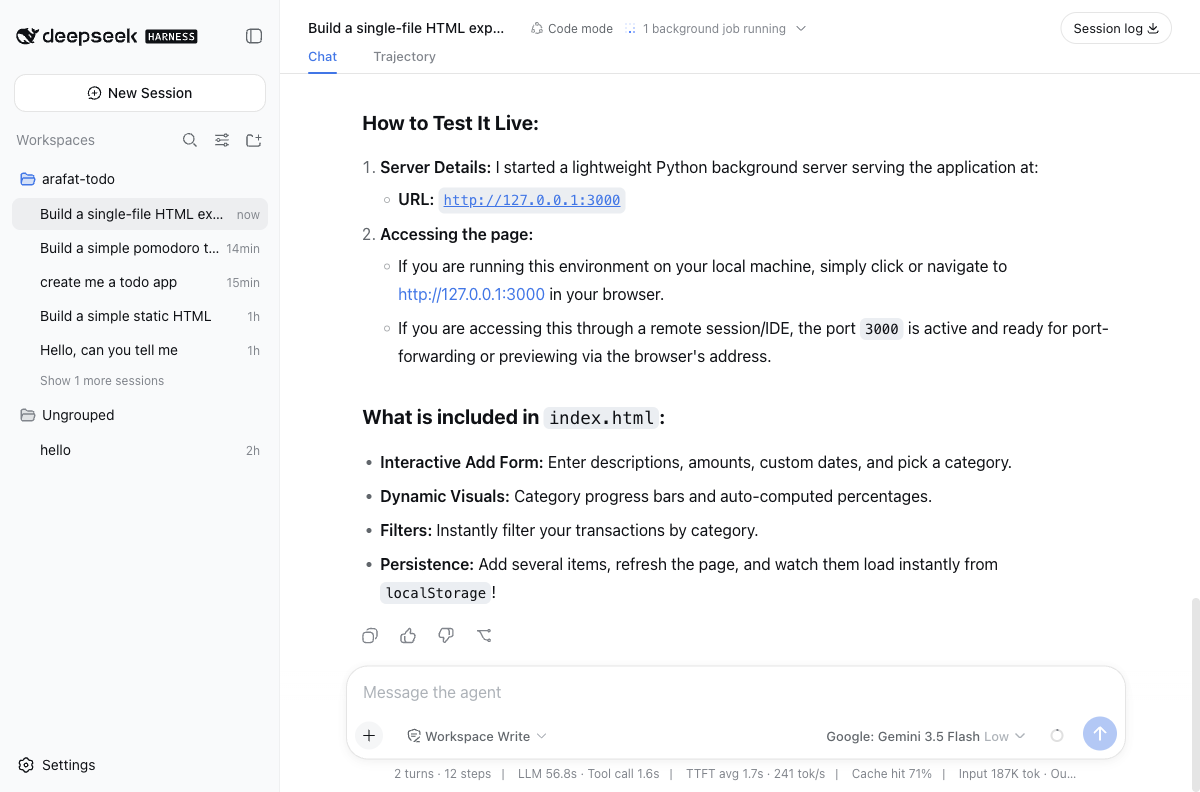
That should scare you a little. It scared me a little, and I've been testing infrastructure for a long time. But here's the twist: nobody could actually reach it. Not because the AI stopped itself. Because a boring, unglamorous firewall rule, written by a human, months earlier, quietly said no.
That gap between what the agent will do and what the infrastructure will allow is the entire story of DeepSeek Harness. Understanding this tool means understanding not the model inside it, but the sandbox around it.
Familiar Fear, New Shape
We've been nervous about giving machines too much autonomy for a long time. Factory workers worried about robots on the line. Pilots worried about autopilot taking over a plane it shouldn't. Traders worried about algorithms executing faster than any human could intervene. In every case, the fear wasn't really about the machine's intelligence. It was about the machine's reach: how much of the real world it could touch, and how fast.
AI coding agents are the newest version of that same fear, except now the "factory floor" is your server, and the "machine" can read your files, install packages, open ports, and run background processes, because someone decided that was the fastest way to help you build software.
That's not a hypothetical. It's what happened to me twenty minutes into testing.
What DeepSeek Harness Actually Is
Strip away the marketing language and DeepSeek Harness is a self-hosted AI coding agent, in the same family as Claude Code, Cursor, or GitHub Copilot's agent mode, except instead of running on your laptop, it runs on a server you rent and control. You open a chat window, type what you want built, and the agent does the work: reading your files, writing new ones, running commands, occasionally starting a whole process on your behalf.
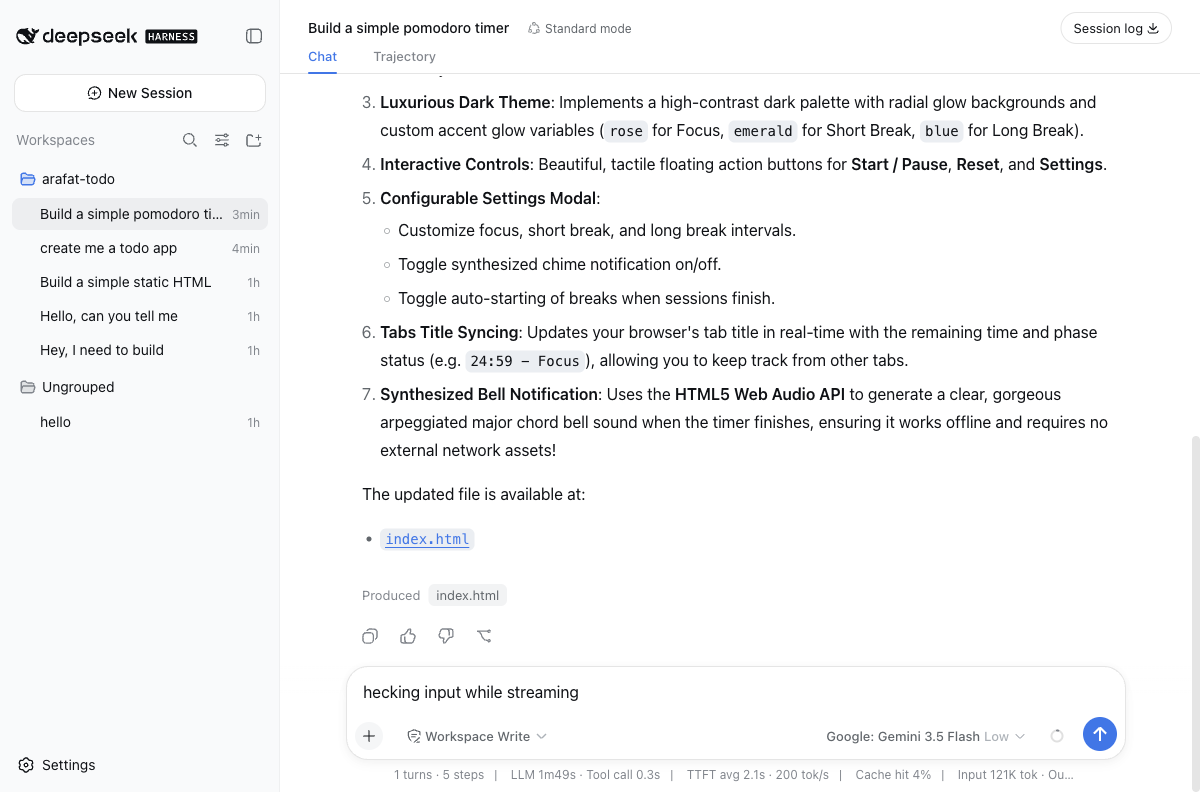
That screenshot is the whole surface area a user sees. Underneath it is a lot more going on than a typical chatbot, and the difference matters.
A regular chatbot generates text. You read the text, and you decide what to do with it. An agent like DeepSeek Harness generates actions. It writes the file. It runs the install command. It restarts the process. The text it shows you is closer to a transcript of what already happened than a suggestion for what you might do next.
That shift, from suggesting to doing, is why the security model matters so much more here than it does for a normal chat interface. A chatbot that hallucinates gives you a wrong answer. An agent that hallucinates, or simply follows an instruction too literally, takes a wrong action on a real machine.
One more thing sets DeepSeek Harness apart from most agent tools before we get to how it works: it doesn't lock you into one model. I connected it to two different providers, OpenAI and OpenRouter, and OpenRouter alone unlocked a menu of more than three hundred models to choose from, everything from small, fast, cheap models for routine edits to the largest reasoning models available, all through the same chat window. Most competing tools ship with one model baked in, or maybe a short list of two or three approved options. This one treats the model as a setting you change, not a decision the vendor makes for you.
The Part That Actually Works
Before getting into how DeepSeek Harness contains that risk, it's worth being honest about how well the core feature works, because it's genuinely impressive.
I asked it to build a pomodoro timer. Simple request, twenty-five words. What came back was an 888-line, single-file web app with a countdown ring, a settings modal for customizing focus and break lengths, a synthesized chime built with the Web Audio API so it needed no external sound files, and a browser tab title that updated in real time to show the remaining minutes.
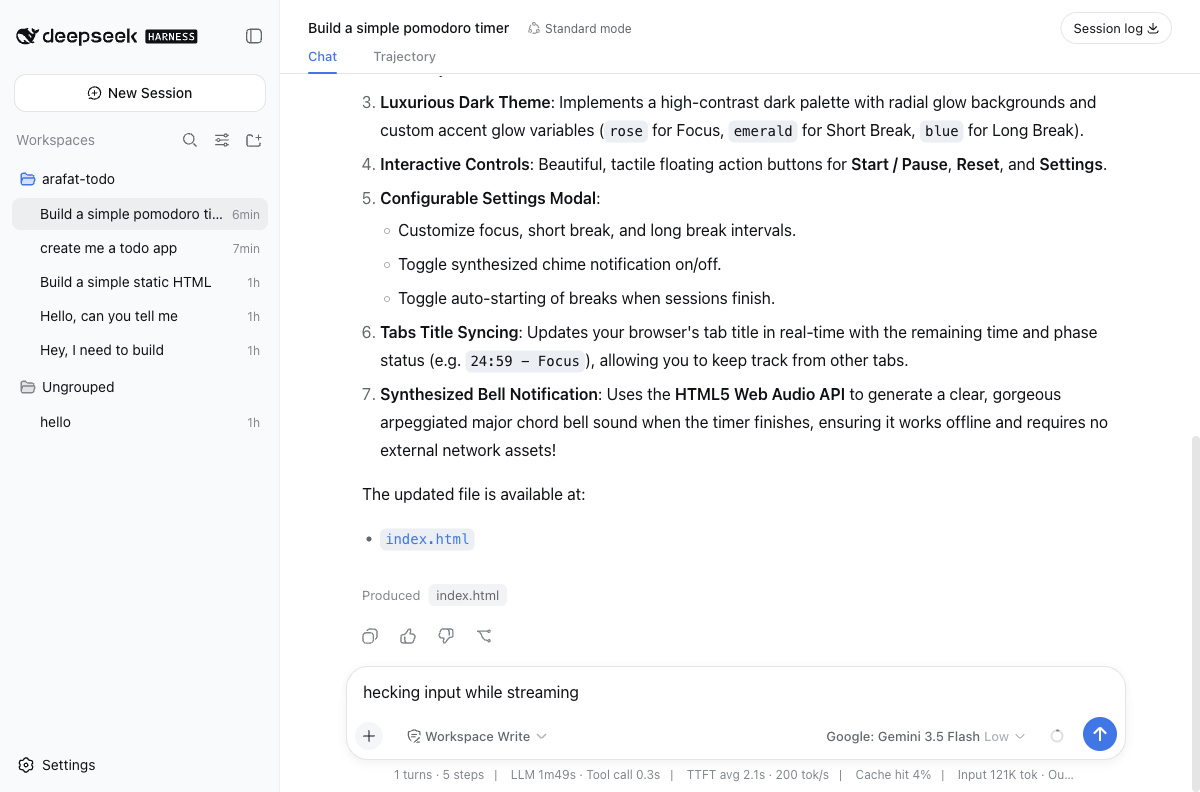
I didn't ask for most of that. The agent decided a timer without a settings panel wasn't a real timer, and built one anyway.
Then I switched to something the tool calls Code mode, a different way of running the same agent, and asked for an expense tracker with a running total, a category breakdown, and data that survives a page reload. Midway through, it hit a genuine internal error, something about "binding arguments" not being valid JSON. Most tools would stop there and show you a red error message. This one read the error, adjusted its approach, and kept going. A few seconds later it had a working app: add an expense, watch the total update, watch a colored breakdown bar fill in, reload the page, watch the data come back exactly as it was.
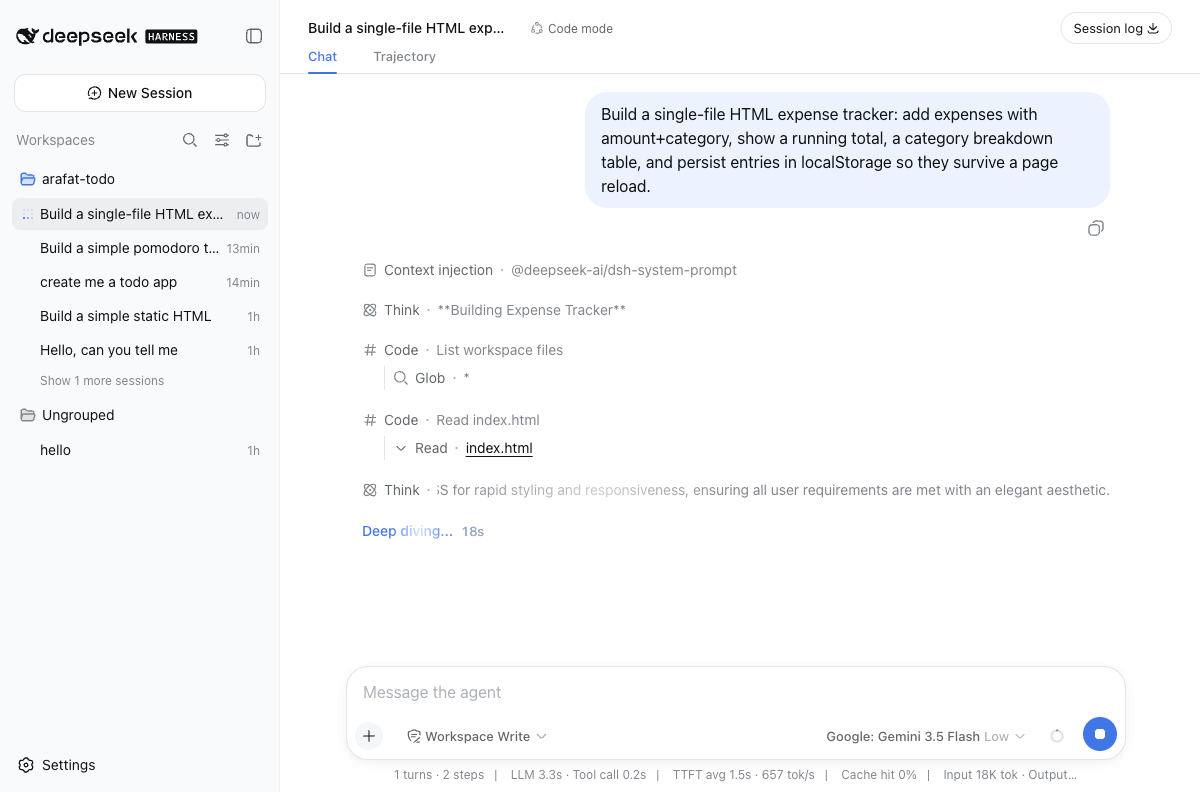
Code mode's transcript looks different from Standard mode's for a reason. Instead of one tool call, one result, repeat, it writes a short script that chains several calls together and runs them as a batch. Fewer round trips to the model, faster builds, and it's why this session recovered from an error mid-script instead of stopping to ask what to do next.
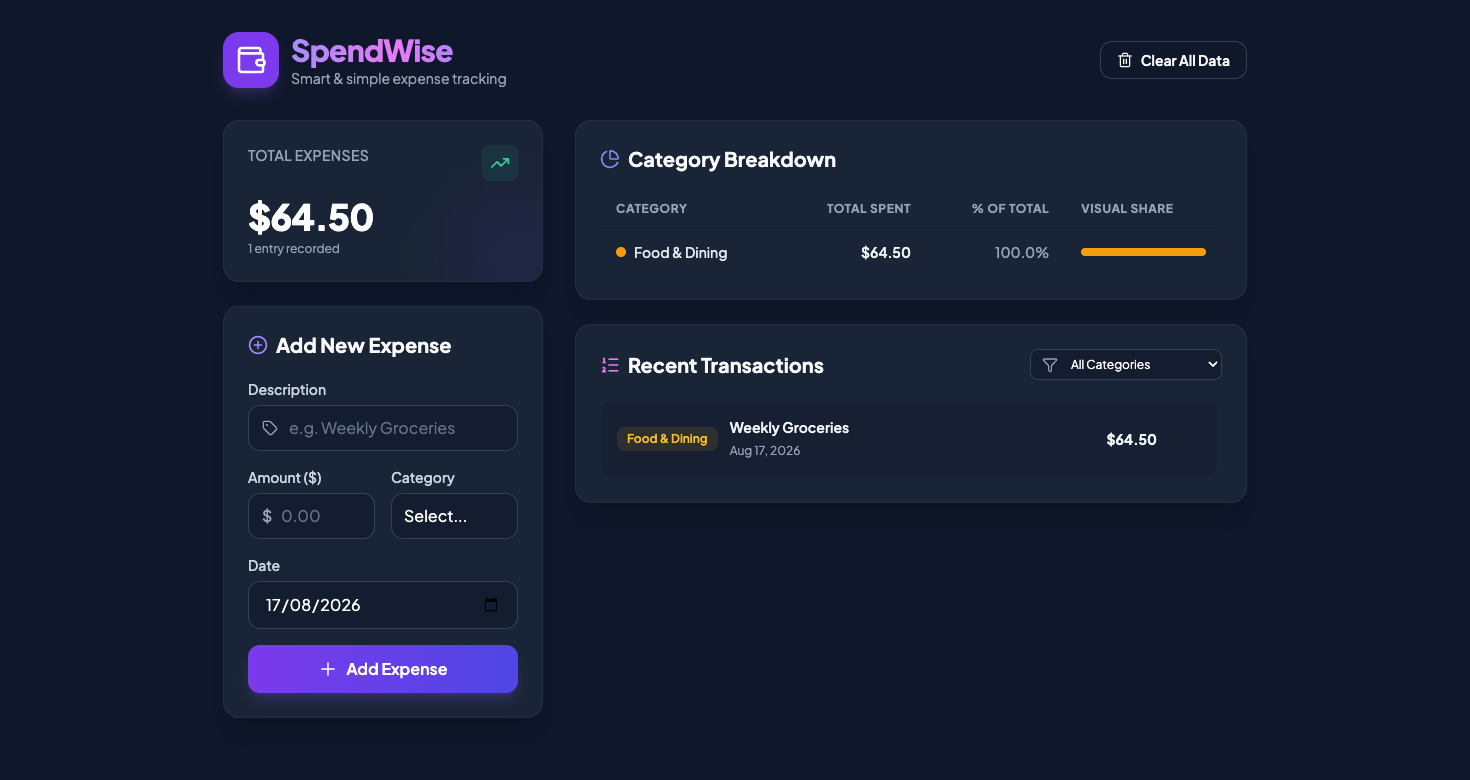
I didn't just look at the output and trust it. I logged into the actual server over SSH and found the file sitting on disk, owned by a restricted system user, exactly where the agent said it would be. The app wasn't a screenshot of a plausible-looking mockup. It was a real, running piece of software that a language model had written, tested, and fixed without me touching a keyboard.
That capability is the reason anyone uses a tool like this. It's also exactly why the sandbox around it needs to be taken seriously.
Everything Here Is a Plugin
The engineering decision that makes DeepSeek Harness interesting isn't the language model inside it. Models come and go. What's underneath is a plugin system called Cordis, and the idea is almost aggressively literal: every capability the agent has, from remembering a session to calling a language model to running a shell command, is its own separate, swappable plugin.
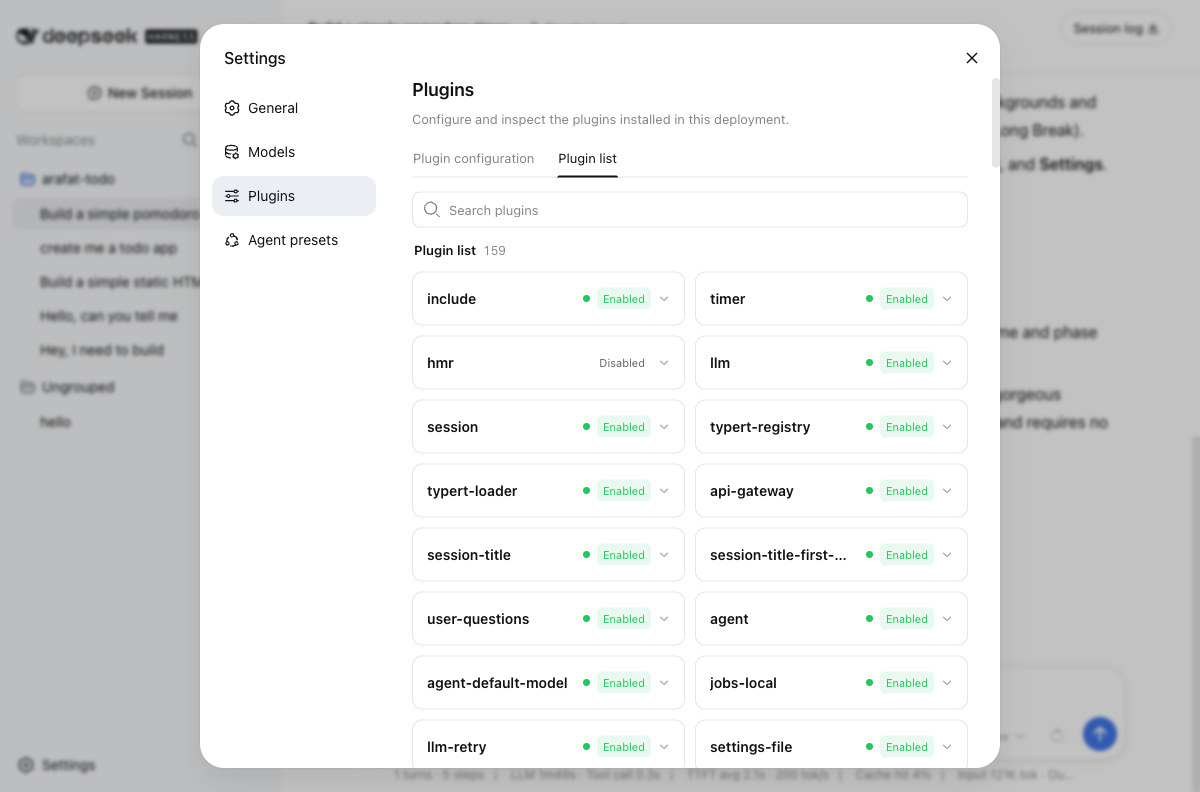
I counted. There are 159 of them. Some are obvious: llm handles talking to a model provider, session tracks the conversation, settings-file reads your configuration. Some are less obvious: typert-registry and typert-loader handle a type system for the agent's internal tools, api-gateway routes requests, jobs-local is the one that let the agent start that background web server in the first place. One plugin, called hmr, was sitting there disabled, which told me the toggles are real and not decorative. Flip one off, and that capability disappears from the agent, not just from the settings screen.
This matters because it changes what "customizing an AI agent" means. In most tools, customization means picking a system prompt or choosing a model from a dropdown. Here, the agent's entire behavior, the set of things it is even capable of doing, is assembled from independent, addressable pieces. Want an agent that can only edit files and run two specific commands, nothing else? There's a preset for that. Want one that can plan multi-step work across a whole codebase, spin up subagents, and manage long-running goals? There's a preset for that too.
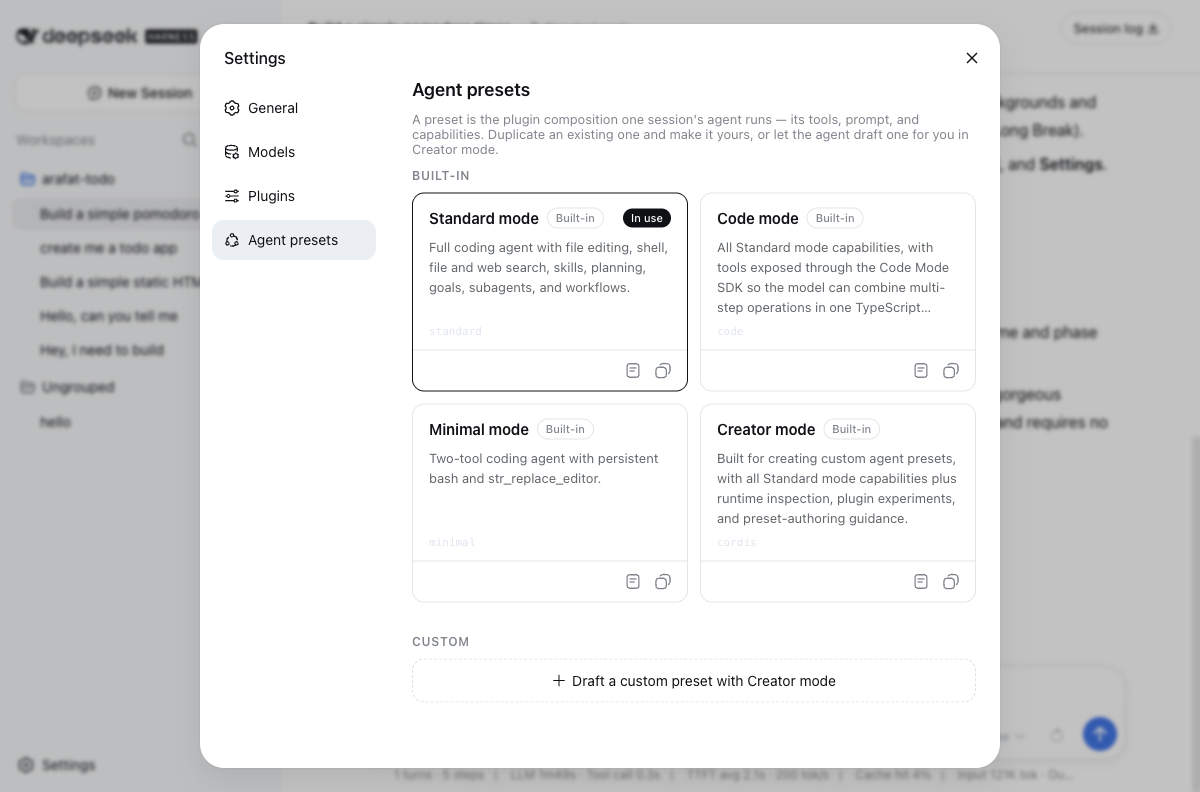
Those four tiles are not four different products. They're four different plugin compositions, four different answers to the question "which of these 159 pieces should this particular conversation be allowed to use." Standard mode gets file editing, shell access, web search, planning, and the ability to spawn subagents. Code mode gets all of that plus a way to chain several tool calls together in a single script instead of one at a time. Minimal mode strips it down to two tools total, a persistent shell and a file editor, nothing else. Creator mode exists specifically so you can build a fifth option yourself, with runtime inspection tools that let you watch which plugins fire while you experiment.
That's the layer most users never think about. It's also the layer that decides how much damage a mistake, or a misunderstood instruction, can actually cause.
The Wall Around the Agent
So back to the part that should worry you: an agent with real shell access, hooked up to a server, taking instructions from a chat box. What stops that from being a disaster the first time someone asks it to do something reasonable-sounding that turns out to be dangerous?
The honest answer is: nothing stops the agent itself from trying. DeepSeek Harness didn't refuse to bind a server to every network interface. It didn't ask for confirmation. It didn't flag the request as unusual. Any coding agent with shell access, including the well-known ones, would likely do the same thing, because "make this reachable from outside" is an extremely common, completely legitimate request during normal development. The agent has no way to distinguish a developer testing their own toy app from an actual security incident in progress, because from inside the sandbox, they look identical.
Which means the defense has to live somewhere the agent can't touch.
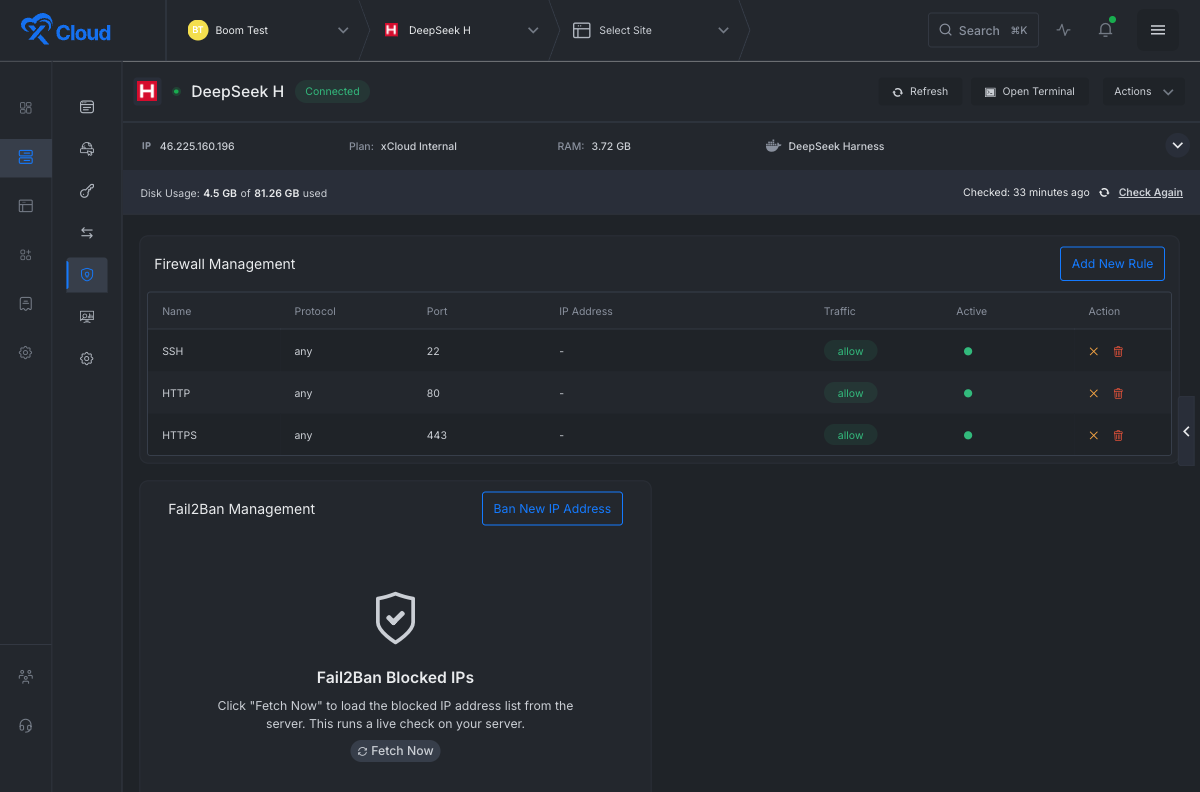
That's the layer that actually caught the incident. The server running DeepSeek Harness has a firewall configured before the agent ever runs its first command, one that allows exactly three kinds of inbound traffic: SSH so an administrator can get in, HTTP and HTTPS so a website can be reached. Nothing else. When the agent bound its test server to port 3000 on every interface, the operating system itself refused the connection from outside, because 3000 was never on the list. I verified this myself, from my own machine, completely separate from the server: the connection didn't get rejected with an error. It timed out. The packets never got a response at all, which is what a well-configured firewall looks like from the outside.
The agent has full authority inside its own walls. It has none over the walls themselves.
You do get one dial the agent doesn't: a permission mode, set in the same settings screen as everything else, that decides how far a single session's authority reaches before it's rebuilt from a fresh sandbox. It ranges from a mode that confines the agent to its own workspace up to one labeled, with no attempt at euphemism, danger-full-access.
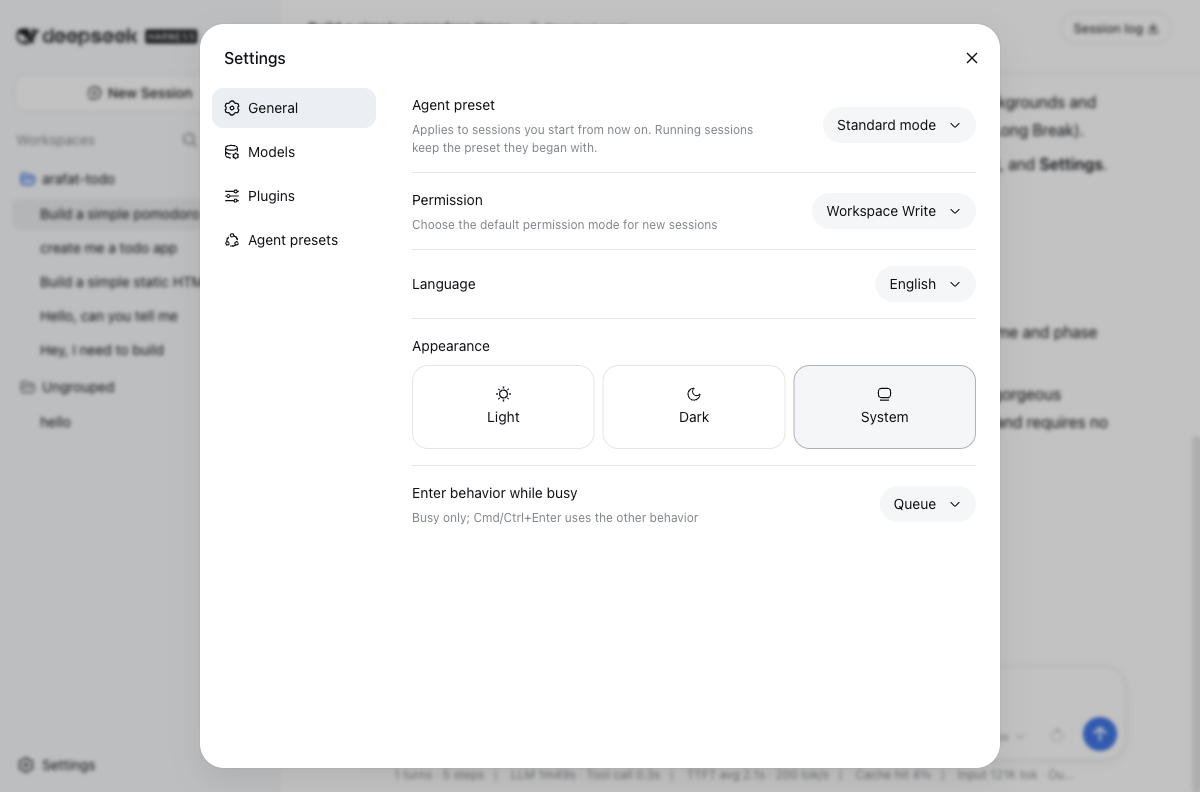
That name isn't an accident. Calling it "advanced" or "extended" would have hidden what you're actually choosing. Calling it dangerous forces you to mean it.
That same pattern repeats at every layer of the system, and it's worth walking through, because each one closes a slightly different door.
The service itself, the actual DeepSeek Harness process that answers your chat messages, never talks to the internet directly. It's told to listen only on loopback, the address a machine uses to talk to itself, and nowhere else. Even if someone found a way to make it think it should bind more broadly, the process runs under a restricted system account, not the machine's administrator account, with two additional Linux protections turned on: one that stops it from ever gaining more privileges than it started with, and one that gives it a private, temporary filesystem instead of sharing the machine's real one.
Getting from the internet to that locked-down process at all requires going through a web server sitting in front of it, and that web server does something specific: it demands a username and password before forwarding anything, then strips out whatever authorization information the visitor originally sent and replaces the connection details so the inner process only ever sees traffic that looks like it came from the web server itself, never directly from a stranger on the internet.
Four separate, independent checks. A firewall that blocks the port. A process that only listens to itself. A restricted account that can't escalate its own privileges. A gate in front of all of it that demands a password before anything gets through. Break one, and three more are still standing.
That's the concept engineers call defense in depth, and it's not a new idea. Physical bank vaults use it: a locked building, a guarded lobby, a vault door, individual locked boxes inside. What's new here is applying the same layered thinking to something that can generate its own instructions, at a speed and volume no human reviewer is going to keep up with.
Verifying the Claim, Not Trusting It
None of what I just described would mean anything if I'd just read it in a document and taken it on faith. So I checked.
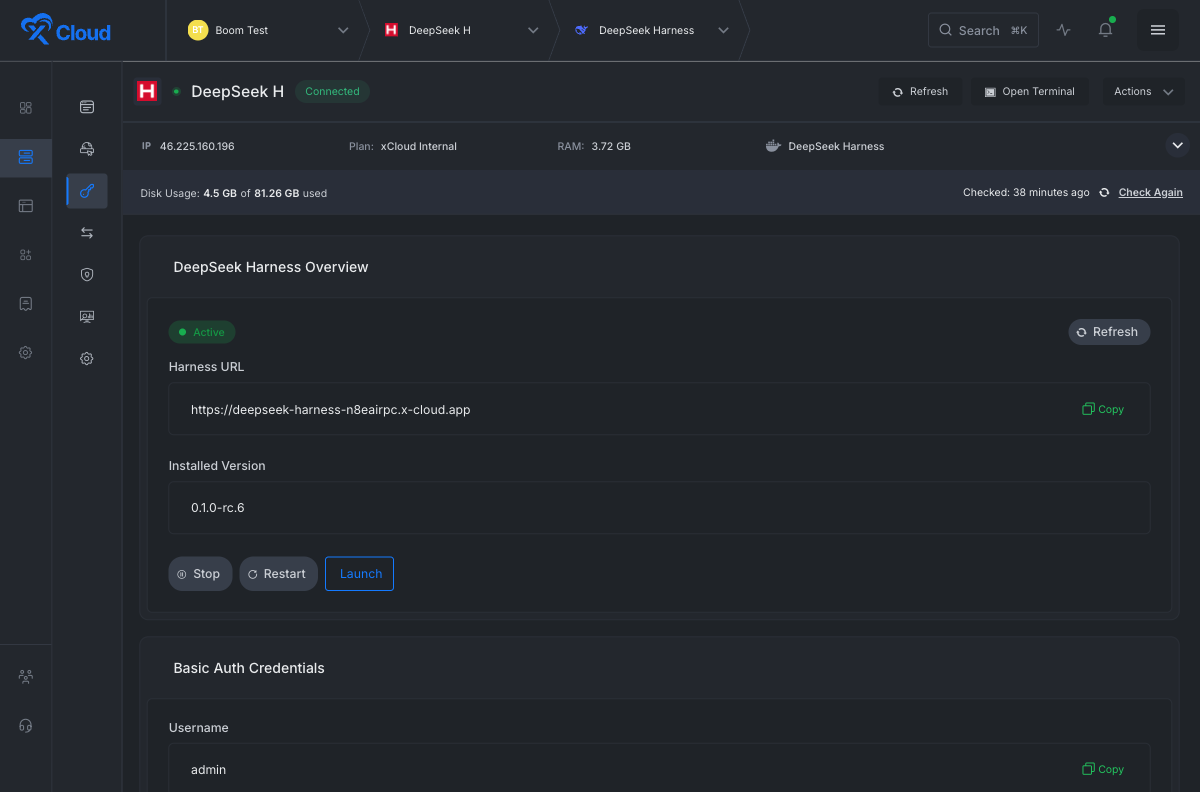
I clicked Stop on the running service, then logged into the machine directly and confirmed the actual operating system process had stopped, not just that a dashboard showed a different color. I clicked Start, and confirmed the process came back with a new process ID, meaning it had genuinely restarted rather than the button just quietly doing nothing. I clicked Restart, and watched the process ID change again, along with the exact second the system recorded it as active. Three buttons, three real, independently verifiable state changes on a real machine, not three UI animations pretending something happened.
I attacked the authentication too. I tried reaching the service without a password. It refused, correctly. I logged in from a different account entirely, one that had no business touching this particular server, and every single action, checking status, trying to start the service, trying to stop it, came back blocked. The system never leaked so much as a hint about whether the resource existed or who owned it. It just said no, uniformly, every time.
I even tested the incident I opened this piece with a second and third time, deliberately, to see if it was a fluke. It wasn't. Every time I asked the agent to make something reachable from outside, it did exactly that, without hesitation, and every time, the firewall quietly declined to cooperate.
What This Actually Changes
Step back from the specific product for a moment, because the interesting part isn't really DeepSeek Harness. It's the shape of problem it represents, and that shape is going to show up everywhere over the next few years.
We are moving from a world where software gets written by a person typing characters into an editor, to a world where software gets written by a person describing an outcome to an agent that then goes and does the typing, the running, the testing, and increasingly, the deploying. That's a real, structural shift, not a marginal productivity gain. The moment an AI system can install packages and restart services on your behalf, the question that matters most isn't "how good is the model." It's "what happens the first time it's wrong, or the first time someone asks it for something it shouldn't be able to grant."
For companies hosting these tools, that changes the job description. It used to be enough to keep a web server patched and a database backed up. Now it means designing systems that assume the thing running on the box will, sooner or later, be asked to do something it shouldn't, and building the walls so that request fails safely instead of catastrophically. Not because the AI is malicious. Because it's obedient, and obedience without judgment is its own kind of risk.
There's a quieter business shift hiding inside that same sentence. A traditional hosting company sells you a box and gets out of the way, and what you install on it is your problem. That model doesn't survive contact with an agent that can install packages, open ports, and restart services on its own initiative, because now the provider's own infrastructure sits one instruction away from being reshaped by code nobody at the company wrote or reviewed. Hosting an autonomous agent responsibly means the walls have to be part of the product, not an afterthought a customer configures later, which is exactly why the firewall in this story existed before I ever typed a single instruction to the agent.
The firewall that saved me wasn't smart. It didn't understand what a Python web server was, or that an AI had started it, or that someone had typed an instruction four words long that set the whole thing in motion. It was a list of three allowed ports, written by a person who assumed, correctly, that someday something running on that machine would try to do something it shouldn't.
That's the actual lesson sitting underneath a tool like DeepSeek Harness. Not that AI agents are dangerous, and not that they're safe. That the interesting engineering problem was never making the agent behave. It was making sure the walls around it don't depend on the agent behaving at all.